
For the CEO, the CFO and IT
Apollo 365 AI Central: one AI agent for the whole company, on your Microsoft 365.
One central agent works across every module: CRM, operations, HR, assets, tickets, documents, integration and payments. The agent proposes, drafts and follows up; people validate and approve. It runs in your tenant, on the Microsoft 365 licences you already have, with no Dynamics 365 licence.
- 13document management systems and intranets delivered on Microsoft 365
- AI agent programmefor a utility company, won through a utilities-sector tender
- SharePoint governance since 2010permissions, metadata and retention: the data agents read
One agent, eight modules
Each module can be bought on its own. All of them share the same data, the same roles and the same documents, and the agent works across all of them.
CRM. For the sales director: the follow-up is already written
An e-mail sent to the sales team becomes a proposed lead. When an opportunity has no recent activity, the agent drafts the next e-mail, and the manager gets the list of inactive opportunities in Teams, with their value.
Operations. For finance and purchasing: approvals based on predefined rules
One sentence in Teams becomes a purchase request from the catalogue. Contracts, the document register and procedures are approved in the same workflow, with who approved what and when.
HR. For HR and operations: who is away, why, and how much leave is left
Leave is approved from a card in Teams, and the monthly timesheet is filled in automatically from approved requests. When someone is hired, the decision becomes a task list with deadlines and owners.
Assets. For facilities and fleet: notifications before expiry
Insurance, inspections, servicing, calibration, warranties. One card in Teams for each asset, before anything expires.
Tickets and services. For IT and delivery teams: tickets assigned by category
A ticket opens from one sentence in chat, with the category, team and SLA set by rules. Client work is planned by person and by day.
Documents. For the CFO and legal: automatic classification and metadata search
Every document sits next to its record, in SharePoint. The AI model identifies the document type and fills in the metadata, and the document is moved to the record's folder.
Integration. For IT: the ERP, the tax portal, the bank and the courier, in one layer
In both directions, with every message tracked and replayable. An on-premises ERP is read straight from its database, with no API needed.
Payments. For the CFO: payment only for invoices matched to an order and a receipt
The order, the delivery note and the e-invoice are matched. The payment is prepared in the bank, and a person sends it.
Implementation in four steps
Each step builds on the one before. The agent uses the data, documents and permissions configured in the previous steps.
- 01
One app, one data model
Requests, approvals, assets, people and clients, in a single Power Apps application.
 Power Apps
 Dataverse
- 02
Documents in order
Every document next to its record, classified and filed automatically.
 SharePoint
- 03
Integration with existing systems
The ERP, e-invoicing, the bank and the courier, through one integration layer.
 Azure
- ERP
- 04
The AI agent
The agent proposes, drafts and follows up, in Teams or in Claude. People approve.
 Teams
 Copilot Studio
People validate and approve
The agent proposes, drafts and follows up. Nothing is saved, sent or paid without a person confirming it. Every usual fear about an agent has a mechanism that answers it.
- “It will invent items and prices.”
- It uses only real data, from the catalogue, from records or from what the user typed.
- “It will choose for me.”
- Options become buttons. Five possible answers means five buttons, and the choice stays with the person.
- “It will see what it should not.”
- It runs with the signed-in user's permissions, nothing more.
- “Nobody will know why it did that.”
- Every proposal and every decision stays in the log, with who confirmed it and when.
On the Microsoft licences you already have
The application runs in your Microsoft 365 tenant. It is not a separate platform to host or license, and it needs no Dynamics 365 licence.
Microsoft 365
SharePoint for documents and Teams for work and approvals, on the subscription the company already has.
Power Apps per app
One licence per user covers every module, because all the modules are part of the same Power Apps application.
Power Automate Premium
For the approval flows, notifications and cards in Teams.
Azure, pay as you go
The integration layer and the AI, billed by usage, in your own subscription.
Setup and two processes, in the first month
Fixed price and scope, following the standard procedure. The recommended order is the Microsoft 365 foundation, then daily operations and documents, then the CRM.
- 01
Setup
The tenant, the application, roles, shared data and the document structure.
- 02
Two processes
The data model and the standard process, walked through with the key users. Deviations are agreed together.
- 03
Build and test
The processes are configured in the company's test environment, and users try them on real scenarios.
- 04
Go-live
A short guide for each role, a recorded session and two weeks of hypercare.
If the Microsoft 365 foundation is not in place yet, we implement it first. Processes are then added one at a time, on the same procedure.
What it looks like at work
Screenshots from the application and from Teams, from a Romanian deployment. Identifying data is blurred.
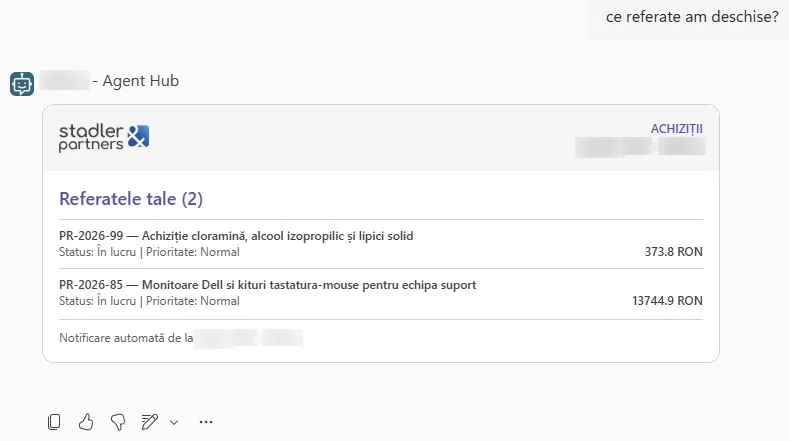
Purchasing: ask in Teams which purchase requests you have open, and get the list with status and amount. 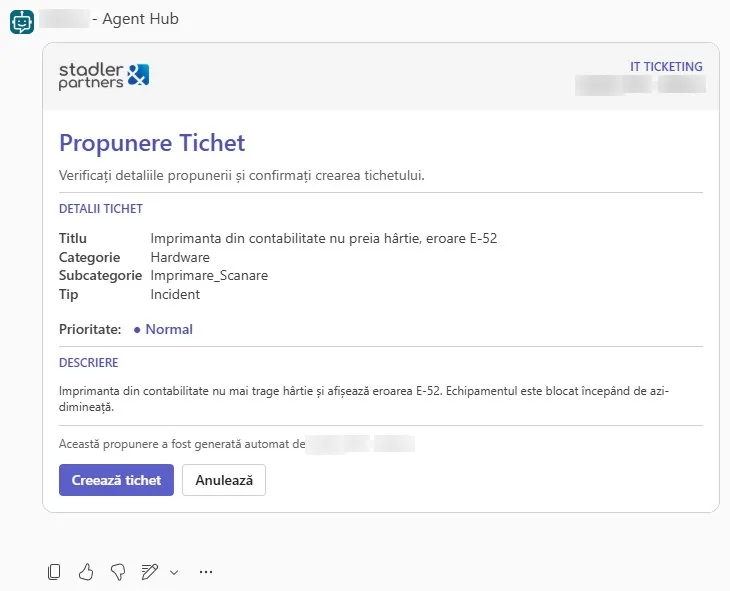
Tickets: one sentence in chat becomes a proposed ticket, with the category filled in. A person creates or cancels it. 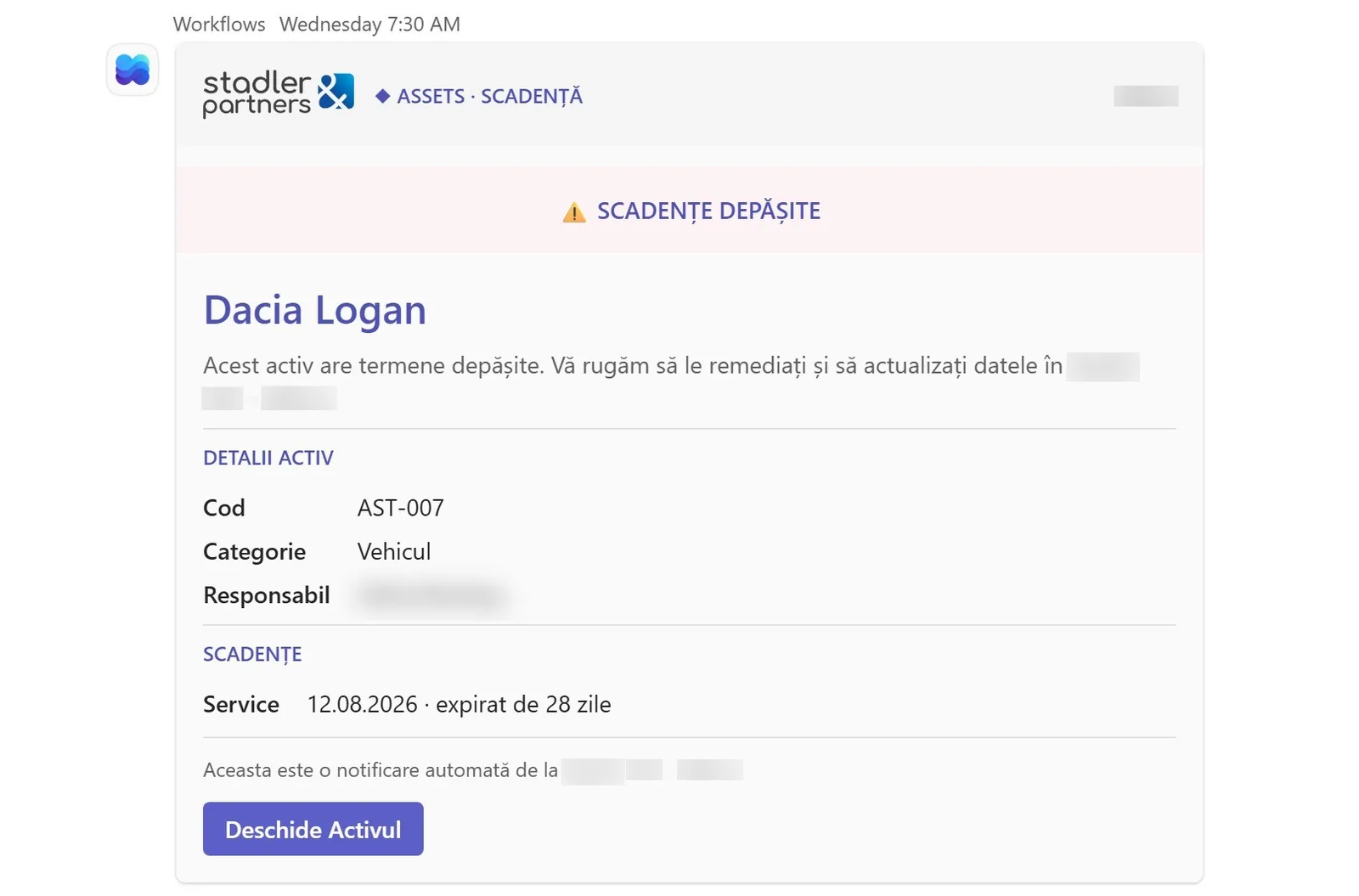
Assets: the card is sent in Teams before a deadline or right after it, for every asset. 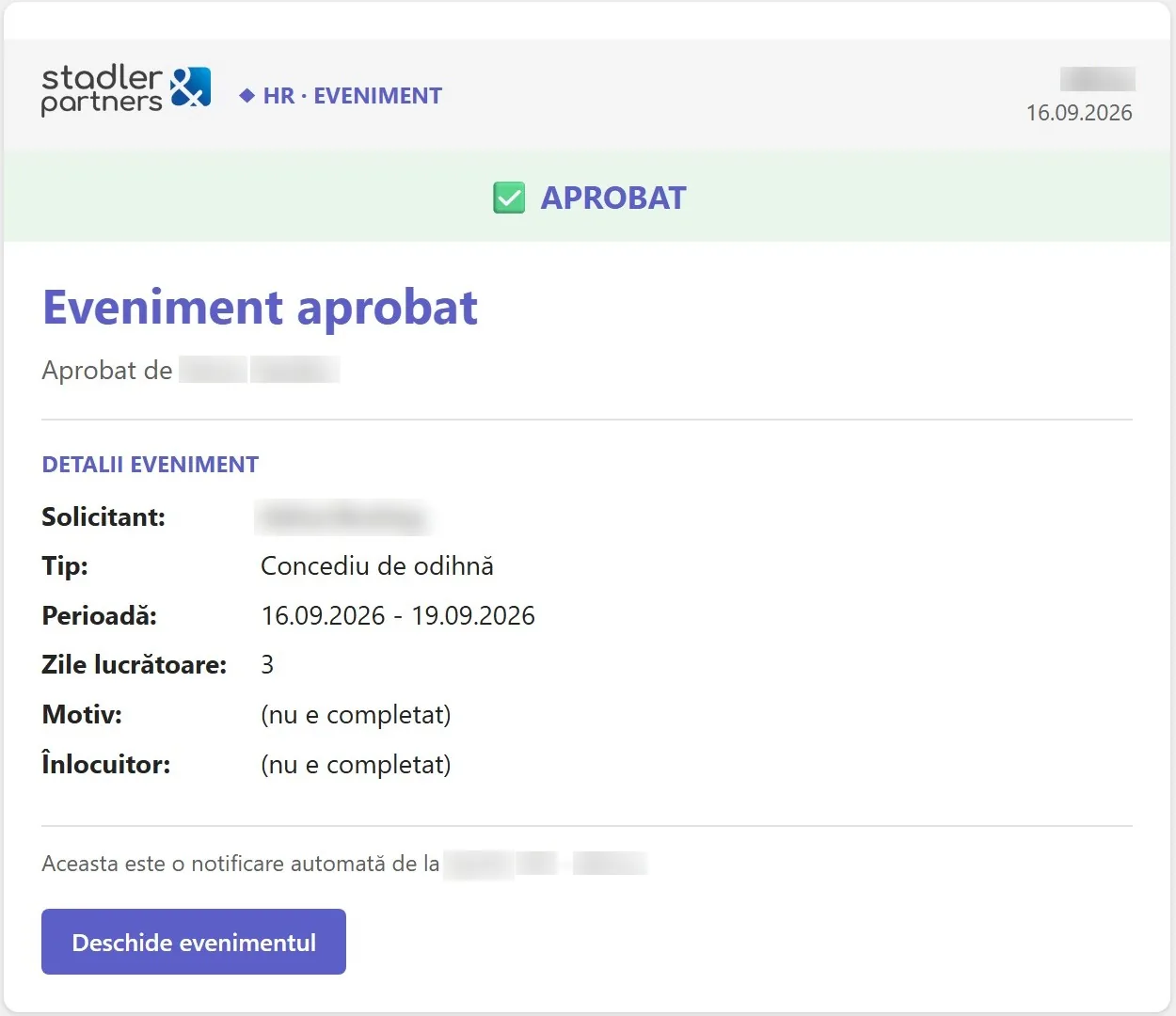
HR: the leave request is approved from a card, and the requester gets the confirmation. 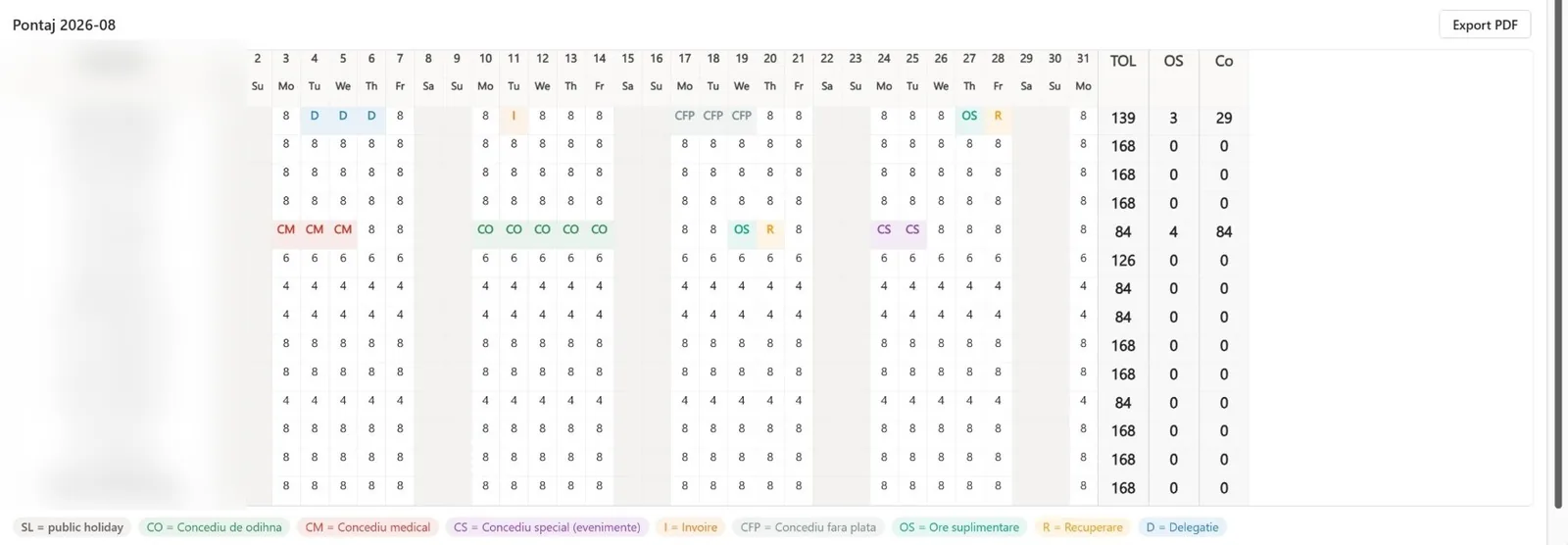
HR: the monthly timesheet is filled in from approved requests. 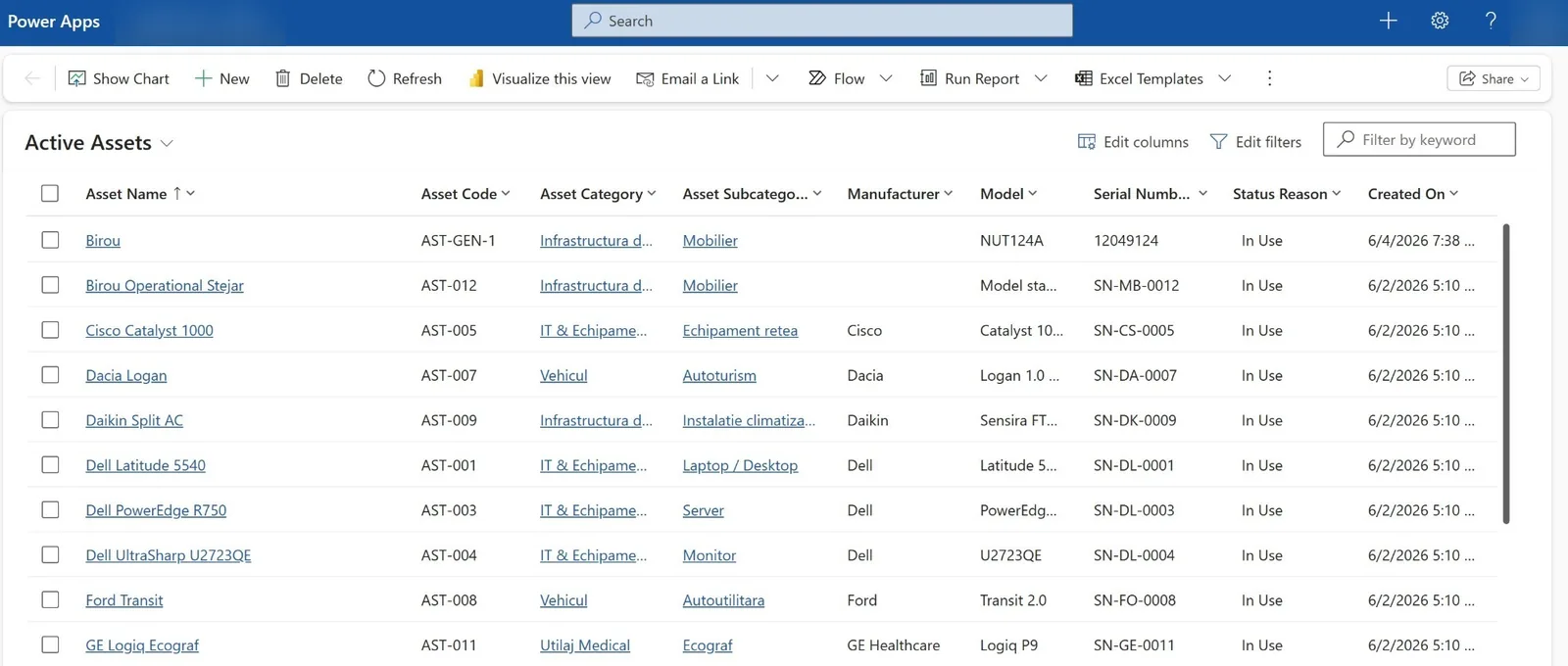
Assets: every company asset in one list, each with its own record. 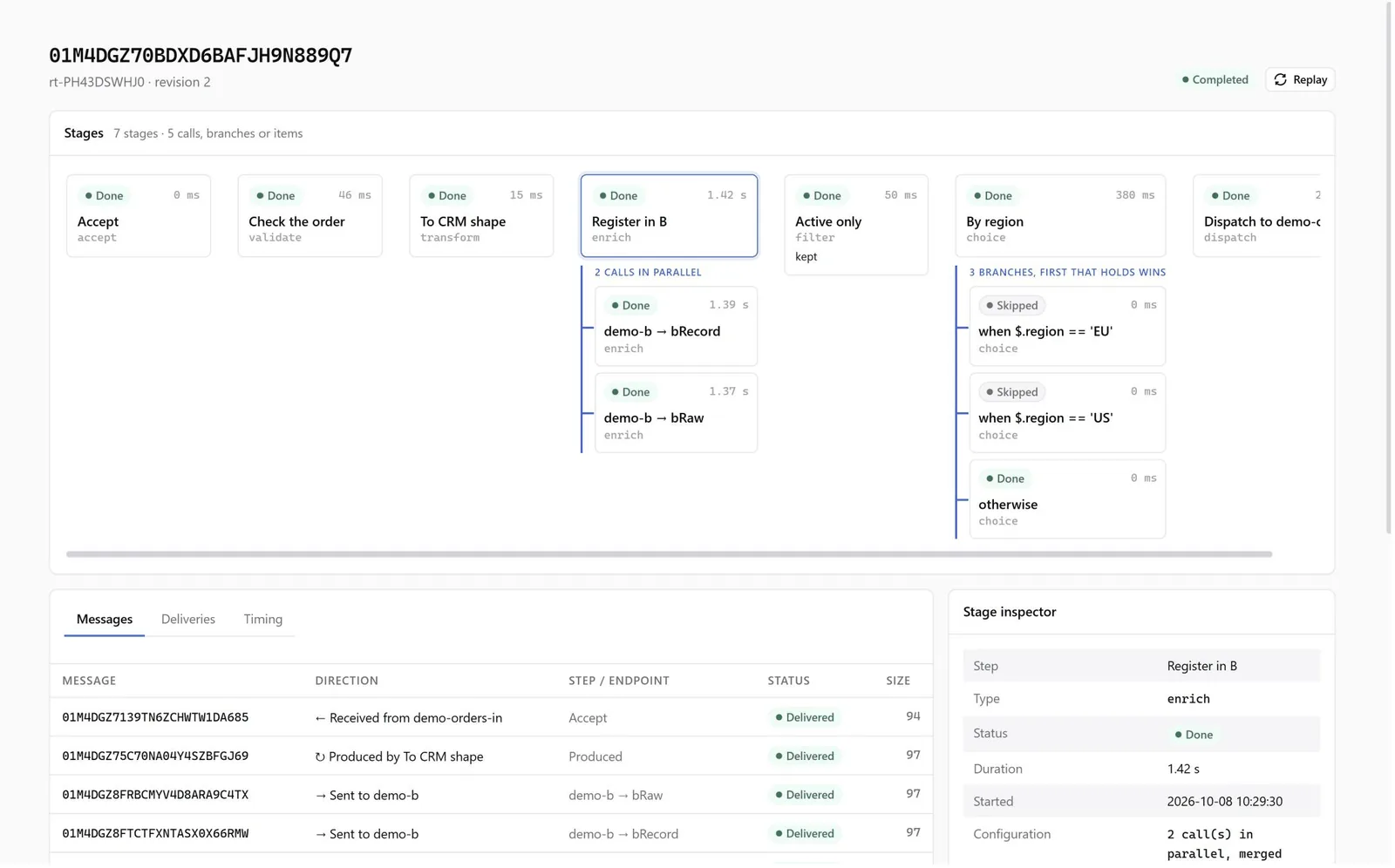
Integration: every message is shown stage by stage, with what was delivered and where, and can be replayed.
Flows that run
Four processes, from the source to the record, through the integration layer.
A supplier invoice, all the way to payment
- 01
The invoice is received
From the supplier, through the government e-invoicing portal.
- e-invoicing
- 02
Import into the app
The integration layer reads the e-invoice and finds the supplier, with no retyping.
- Azure
- 03
It becomes an expense
On the supplier, matched with the order and the delivery note.
- Power Apps
- 04
The payment is approved
A person approves it from a card in Teams.
- Teams
- 05
Prepared in the bank
The payment is created in the bank as a locked draft.
- Bank
Nothing is paid automatically. The payment is saved in the bank as a locked draft until a person sends it.
An approved order, into the ERP
- 01
The order is approved
The purchase request becomes an order to the supplier.
- Power Apps
- 02
The message is picked up
The integration layer checks it and converts it to the ERP's format.
- Azure
- 03
It is delivered
Into the ERP, whether SAP, Business Central or another system.
- Azure
- 04
The order is recorded
The ERP records it and returns its number.
- ERP
- 05
The number is written back to the order
The order in the app and the one in the ERP match.
- Power Apps
If the ERP does not respond, the message stays in the queue and is retried. Every message stays tracked and replayable.
An on-premises ERP, read from its database
- 01
It starts daily
A component on your server runs at the scheduled time.
- ERP
- 02
It reads the ERP
From the SQL database, one definition per entity, for example items and companies.
- ERP
- 03
It compares with the app
It creates what is missing and updates what has changed.
- Dataverse
- 04
It writes the data
In batches, into the application.
- Power Apps
- 05
It keeps the log
Every run is recorded. On an error, the data owner gets a card in Teams.
- Teams
One direction, no deletions. When the ERP has no API, only a small component is installed on your server.
A document, into its folder
- 01
The document is sent
A contract or a register entry, generated or received.
- Power Apps
- 02
It is taken in
The integration layer writes it to the intake library and returns its address.
- Azure
- 03
It is classified
The AI model identifies the document type and the record it belongs to.
- Azure
- 04
It is moved to the folder
From the intake library into the record's folder.
- SharePoint
- 05
The document, in the Documents tab
It opens from the Documents tab of the contract or the register entry.
- Power Apps
Documents classified below the confidence threshold stay in the intake library, for a person to check.
Frequently asked questions
What is Apollo 365 AI Central?
Our product on Microsoft 365: a single Power Apps application with the company's modules, documents in SharePoint, an integration layer to your systems and an AI agent that works across all of them. The agent is used from Teams, through Copilot, or from Claude, through MCP.
Does the AI do anything on its own?
No. The agent proposes, drafts and follows up, and every proposal is shown as a card you can edit or cancel. Nothing is saved, sent or paid without a person confirming it.
How do we know it does not make things up?
It uses only real data, from the catalogue, from records or from what the user typed. Options become buttons, not choices made on the person's behalf. It runs with the signed-in user's permissions, and every proposal and decision stays in the log.
Do we need Dynamics 365?
No. It runs on the licences in your Microsoft 365: Power Apps per app for the application, Power Automate Premium for the flows, and Azure, billed by usage, for integration and AI.
Where is our data stored?
In your own tenant. The application, the documents, the integration and the agent run in your Microsoft 365 and Azure tenant. It is not a separate platform to host or license.
Do we have to change our ERP?
No. The ERP stays the system of record, whether it is SAP, Business Central or another system. The application works alongside it, and the figures are written to the ERP through the integration layer.
Can we take a single module?
Yes. Each module can be bought on its own. The recommended order is the Microsoft 365 foundation, then daily operations and documents, then the CRM.
How long does it take?
Setup and the first two processes in the first month, at a fixed price and scope. The rest is added process by process, in the same way of working.
Workflows that use this solution
Purchase approvals
From one sentence in Teams to an approved purchase order.
Supplier invoices
From the e-invoice to a payment prepared in your bank.
Document filing
An AI model classifies the document by type and files it in the matching library.
ERP integration
The approved order is sent to the ERP, and the ERP number is written back to the order.
Asset management
Insurance, inspections, servicing and warranties, with an alert in Teams before the deadline.
Leave and timesheets
The employee requests leave, and working days are calculated from the work schedule, minus public holidays.
IT tickets
From chat to resolution, with the team and the SLA chosen automatically.
Pick the process that costs you the most. We will show it to you with the agent.
In 30 minutes we go through the process and agree what to prepare before the project.

Thank you.
We will reply within one business day.